Every week is a small project-management cycle: review the position, decide what capacity to use, generate production, apply the Project Manager quality adjustment, calculate the EVM result and then adapt your next decision.
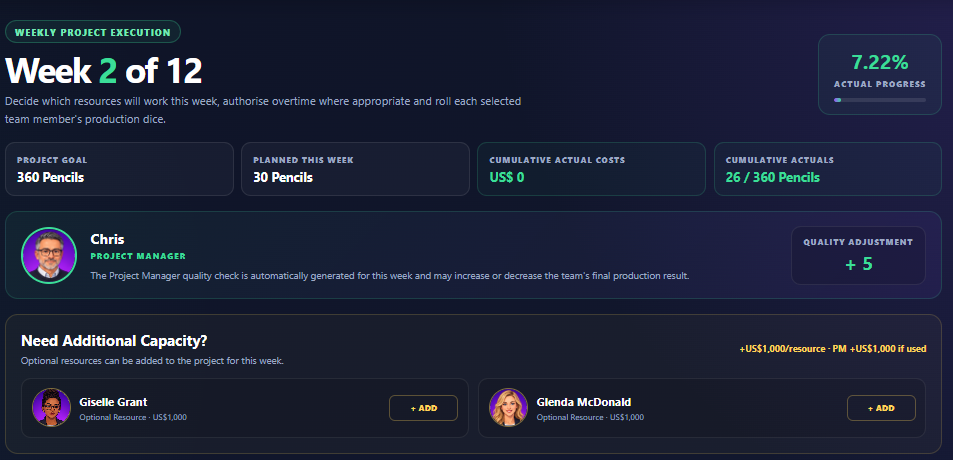
Check which week you are in, the planned 30 objects for the week, cumulative actual objects and cumulative Actual Cost.
The PM quality result can be negative or positive. A negative result represents defective selected objects and reduces accepted production. A positive green result represents useful PM contribution and increases accepted production.
From Week 2, optional resources can be added for the current week. Adding them creates another production opportunity but also increases project cost.
From Week 2, overtime can be authorised for individual working resources. It costs US$250 per selected resource and gives that resource one extra production roll.
Roll each resource that will work. The dice are not guaranteed output, so a more expensive week does not automatically produce a better result.
When the required production rolls are complete, continue to the report. The game carries your resource, overtime, production and PM adjustment into the reporting calculation.
Complete the report in sequence, then use the dashboard and statistics to understand what changed and why.
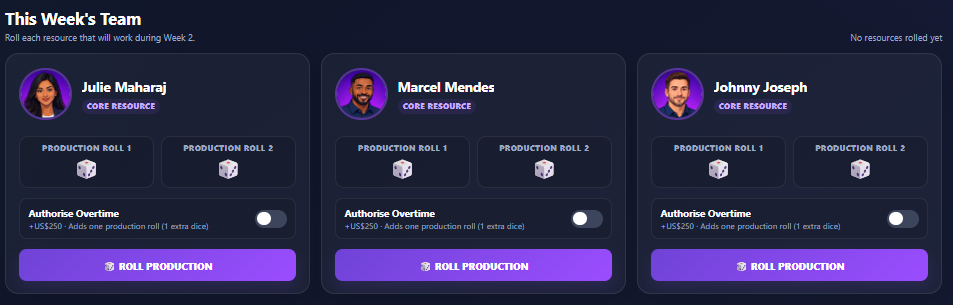
Week 1 uses the three core resources and does not offer overtime or the optional resources. From Week 2, you begin making capacity and cost trade-offs.
Still not finding the answer to your question?
Our support team can help. Tell us what you were trying to do and, if possible, include a screenshot of what you see.